
For some Junipeer integrations, the simplest setup path is to give Junipeer collaborator access to your Shopify store. With collaborator access, Junipeer can set up the integration on your behalf without you needing to create a custom app.
How collaborator access works
Shopify collaborator accounts are designed for external partners — agencies, developers, integrators — to access a merchant's store without taking up a paid staff seat. They have controlled, granular permissions and can be revoked at any time.
Learn more on Shopify: Collaborator accounts →
How to grant Junipeer collaborator access
Step 1 — Find your Collaborator Request Code
In your Shopify admin, go to Settings → Users and permissions. Scroll down to the Collaborators section.
You will see a 4-digit Collaborator Request Code:
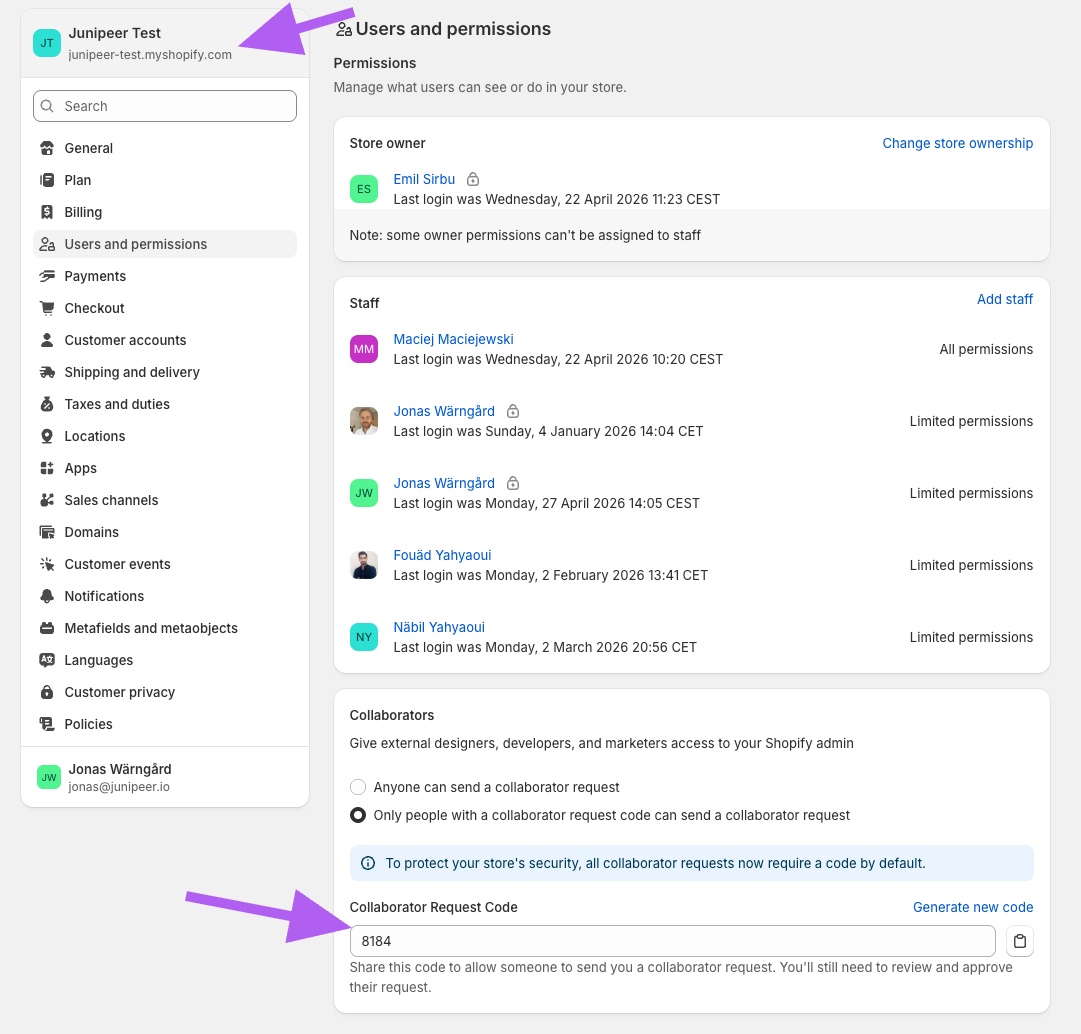
This code is required to protect your store's security — without it, Junipeer cannot send a collaborator request.
If you cannot see the code, click Generate new code at the top right of the section.
Step 2 — Share the code with Junipeer
Send your Collaborator Request Code to your Junipeer onboarding contact. We will use it to send a collaborator request from our Shopify Partner account.
Step 3 — Approve the collaborator request
Once we send the request, you will receive a notification in your Shopify admin. Open it, review the requested permissions, and click Approve.
Junipeer will then have access to your store and can complete the integration setup on your behalf.
What happens next
Once approved, Junipeer will:
Set up the custom app on your store
Configure the required API scopes
Provide you with the credentials to enter in the Junipeer app
You do not need to take any action in Shopify after approving the collaborator request — Junipeer handles the rest.
Revoking access
You can remove Junipeer's collaborator access at any time from the same Settings → Users and permissions page in Shopify. This is your safety net — collaborator access is fully under your control.
For the full Shopify integration setup, see Shopify Setup. For questions, contact support@junipeer.io.