
Scheduling flows in Junipeer
Junipeer's scheduling system determines when and in what order your integration flows run. In other words, this is a way of automatising the data operations. Setting up and enabling the Scheduling for the first time renders the Junipeer go-live.
How to add a rule
Under Configure → Flows → Scheduling, click on Add scheduling rule. There you can choose between currently set Flows:
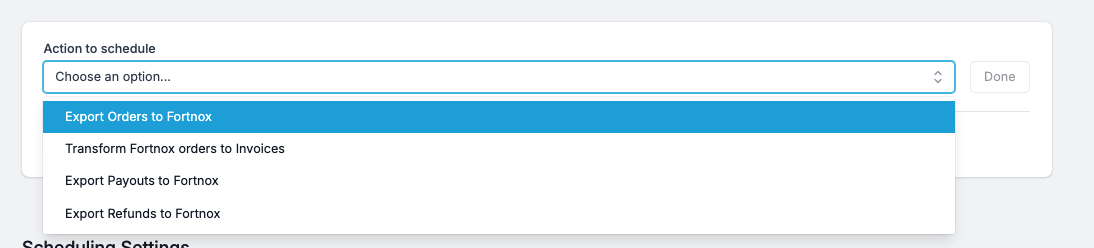
After choosing a flow that you would like to automise, you can choose between two types:
Scheduled Rules
Scheduled Rules are the simplest kind: pick an interval, and Junipeer runs the flow at that cadence. Common intervals include every 15 minutes, hourly, every 12 hours, and daily.
How to pick an interval:
How fresh does the data need to be? Order sync typically runs every 5-10. Payout sync often runs every day at 11PM, because PSPs generate settlement data once per day.
What's the source system's rate limit? Running too often against a rate-limited API wastes calls and can trigger throttling, so it's not recommended to strain Junipeer API with most frequent updates. If you want to cap the updates on a faster pace, please consult this with your Onboarding Manager.
What's your daily volume? High-volume shops benefit from more frequent runs to keep batch sizes manageable
Typical recommended intervals:
Orders: every 6 minutes
Products / stock: every 15 minutes
Payouts: every day at 11PM
Trigger Rules
Trigger Rules run a flow after another flow finishes — they don't have their own schedule. This is how Junipeer enforces logical dependencies between flows.
Why this matters: some flows only make sense once their prerequisite has completed. You cannot transform orders into invoices before the orders exist in Fortnox. You cannot export refunds before the invoices they credit have been created.
A typical Fortnox integration uses this chain:
Export Orders to Fortnox (scheduled every 15 min)
    ↓ triggers
Transform Fortnox orders to Invoices
    ↓ triggers
Export Refunds to Fortnox
Each downstream flow inherits its execution cadence from the upstream one. If Export Orders runs every 15 minutes, the entire chain runs every 15 minutes. If Export Orders is paused, nothing downstream runs either.
Tips
Test manually before enabling scheduling. Run a test order through the flow manually first, verify the result in Fortnox, then enable scheduling. Catching a mapping error before it runs 96 times a day is much better than after
Check the Logs view after enabling. The first 24 hours after go-live are the most likely time to discover a misconfiguration. See the troubleshooting guide for how to filter for errors
Disable, don't delete. If you need to pause a flow, disable the rule rather than deleting it. This preserves the configuration for when you want to resume
Triggers propagate failures. If a scheduled flow fails, its trigger children won't run. This is intentional — it prevents corrupt downstream data — but it also means one failure can silently stop several flows. Monitor the whole chain, not just the top