
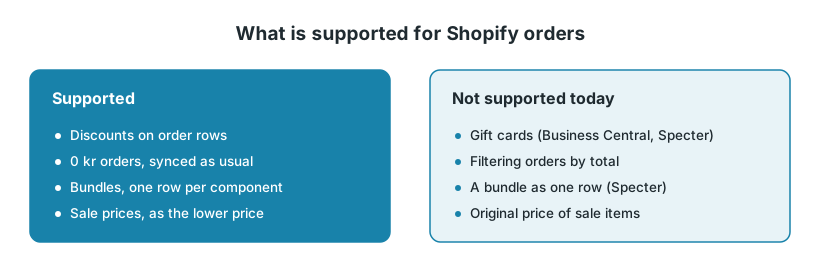
When a Shopify order goes to Fortnox, Business Central or Specter, discounts on the order rows go with it, and 0 kr orders are synced like any other order. For gift cards, only the Fortnox order flow has a setting. In Fortnox and Specter, Shopify Bundles arrive as one row per component.
1. Discounts
For each order row, Junipeer reads the product's original price and the discount Shopify has put on that row, for example from a discount code. The discount goes to the ERP with the order.
Specter. Each row gets the price and a discount percent. To send the discounted price instead, use the setting Discount Percentage. See Discount Percentage.
Sale prices are not discounts. If you lower a product's price in Shopify with a compare-at price, the order row simply has the lower price. Sending the original price as well is not supported.
If the discounts in your ERP don't match what the customer paid, contact support.
2. Gift cards and store credit
Fortnox. The order flow has the setting Account Number for credit vouchers (gift cards), under Setup Sales Account mapping. It sets the account used for credit vouchers such as gift cards. Which account to use is an accounting decision; ask whoever does your bookkeeping. See Account Number for credit vouchers (gift cards).
Business Central and Specter. The Shopify order flows have no setting for gift cards or store credit.
If you sell gift cards, or want to offer store credit on returns, contact support before you start. We'll check that they're booked the way your accountant expects.
3. 0 kr orders
Orders with a total of 0 kr, such as free replacements, are synced like any other order. There is no filter or setting that skips orders by their total.
Ask your accountant whether these orders cause a problem. A document with no value usually has nothing to book.
If your 0 kr orders differ from normal orders in a field the order flow can filter on, a filter on that field keeps them out. Click the gear icon on the order flow, then Source → Filters → Manage filters.
If neither helps, contact support.
4. Shopify Bundles
Shopify sends an order with a bundle already split into its components, each with its own article number. The bundle's own article number is not read.
Fortnox: each component arrives as its own order row. If a component doesn't exist as an article in Fortnox, the setting Create missing articles in Fortnox decides whether the integration creates it.
Specter: each component arrives as its own order row. Sending the bundle as a single row is not supported.
When to contact support
Contact support@junipeer.io if discounts in the ERP don't match what the customer paid, if you need gift cards or store credit booked, or if you need 0 kr orders kept out. Include an order number and what you expected to see in the ERP.