
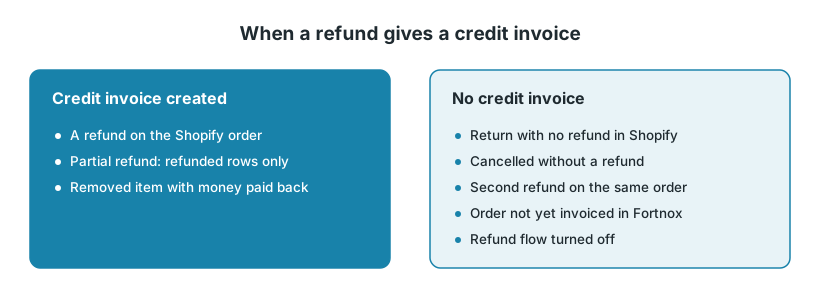
Junipeer creates a credit invoice in Fortnox from a refund on the order in your webshop. If there is no refund, there is no credit invoice. The examples are for Shopify. Centra and Magento have the same refund flows.
1. What has to be in place
The refund flow is on. On the Flows page, check that Export Refunds to Fortnox is enabled, and that it has a scheduling rule or is started by another flow.
The invoice exists in Fortnox. If the order is still an order in Fortnox, the refund fails with "Could not find the invoice id that is created in Fortnox".
Junipeer can find the invoice. If the invoice wasn't created by this integration, for example for orders from before you started with Junipeer, set Refund Reference Field and, if needed, Search Refund Reference on Order.
Two settings decide what happens to the credit invoice:
Book keep credit invoices (on by default) books it in Fortnox. Leave it on if refunds are paid back through a payment provider: the payout can only match a booked credit invoice. See Invoice still unpaid after a payout.
Send credit invoices (off by default) sends it to the customer, using the customer's delivery method in Fortnox.
2. Why no credit invoice was created
Junipeer reads the refunds on the original order. It doesn't read returns or exchanges as such, and a return's own number (for example -R1) isn't used.
What happened | What to do |
|---|---|
A returns app registered the return, but didn't create a refund on the order. The log says "No refunds found for order …". | Make sure the app creates a refund in Shopify, or create the credit invoice by hand in Fortnox. |
A second refund on the same order. Today Junipeer creates one credit invoice per invoice. | Create the second credit invoice by hand in Fortnox. |
The order was cancelled without a refund. A cancellation is not a refund. | While it is still an order in Fortnox, Junipeer cancels it if the status is selected in Canceled Order Status in the order flow's settings. If nothing is selected, nothing is cancelled. If it was already invoiced, credit it by hand. |
The order is still an order in Fortnox. | Turn it into an invoice, then send the refund again (step 5). |
The refund flow is off. | Turn on Export Refunds to Fortnox and give it a schedule. |
3. Partial refunds
A partial refund credits only the refunded rows. This works for the first refund on an invoice.
Partial refunds and refund fees need two articles in Fortnox: refund_fee and refund_discrepancy. Add them as in section 6 of Prepare Fortnox for integration. If a partial refund credits the whole order or the wrong amount, check these two articles first.
A booked credit invoice can't be changed. Correct a wrong one by hand in Fortnox.
4. Order edits after the order was sent
Removing an item. Shopify records the removal as a refund. If money is paid back, the removed rows are credited once the invoice exists. If nothing is paid back, nothing is credited.
Adding an item after the invoice exists. The added amount never reaches Fortnox, because an invoiced order can't be changed. Invoice the difference by hand in Fortnox.
See Fortnox order row settings and post-purchase modifications.
5. Send a refund again
When you have fixed the cause, send the refund again yourself.
On Logs, filter by status Error and search for the order number. The message tells you why the refund failed.
Check in Fortnox that the credit invoice really is missing.
On the Flows page, use Export One on Export one Refund to Fortnox. Enter the Shopify Order ID. If the order has more than one refund, also enter the Refund ID.
Check the credit invoice in Fortnox.
6. Refunds through a payment provider
Svea ↔ Fortnox has its own Export Refunds to Fortnox. Svea sends a credit as one row for the amount, so the credit invoice doesn't show the original order rows. See Svea ↔ Fortnox — configuration guide.
Klarna ↔ Fortnox and Kustom ↔ Fortnox only handle payouts. Credit invoices come from your webshop integration.
No webshop integration in Junipeer? Then refunds paid back through Klarna or Kustom don't create credit invoices in Fortnox. Create the credit invoice in Fortnox yourself, or in the system that creates your invoices.
7. When to contact support
Contact support@junipeer.io if a refund still doesn't create a credit invoice after you sent it again, or if credit invoices get the wrong rows or amounts. Include:
The Shopify order number and, if you have it, the refund ID
The Fortnox invoice and credit invoice numbers
The error message from Logs
Which returns app you use, if any