
An invoice in Fortnox is marked as paid when the payout flow finds it and registers the payment, not when the customer pays. If the invoice didn't exist yet, wasn't booked, or has a different reference when the payout ran, the payment can't be matched. Fix the cause, then run the payout again for that date.
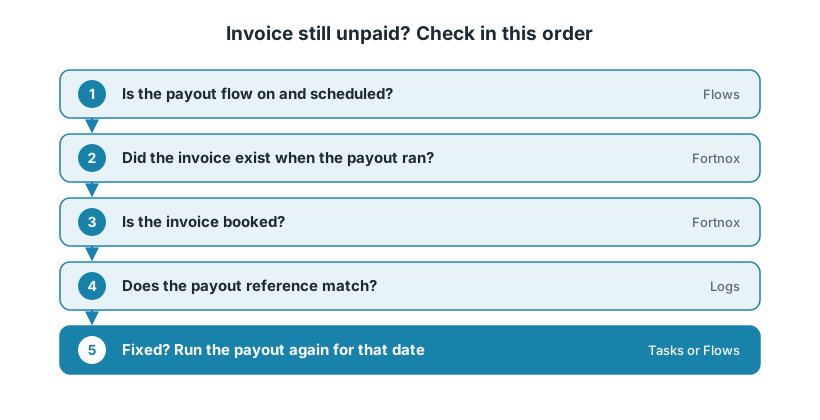
This applies to the payout flows for Fortnox, for example Svea, Klarna and Shopify Payments.
Before you start
On Logs, filter by status Error and search for the order number. The message tells you which check below to start with.
1. Is the payout flow on and scheduled?
On the Flows page, check that Export Payouts to Fortnox is enabled.
Check that it has an enabled scheduling rule, for example once a day at 23:00. Without a schedule it never runs.
In the flow's settings, Book keep invoice payment must be on. It is needed to mark invoices as paid.
If the order was paid with a method that has no payout integration, for example PayPal, no payout will ever match it. See Connecting unsupported payment solutions.
2. Did the invoice exist when the payout ran?
This is the most common cause. The log says "no invoice found".
It happens when the customer pays at checkout, but the invoice is only created later, for example when the order is fulfilled. The payment provider can pay out before you ship.
The order isn't in Fortnox at all. See Orders not showing up in Fortnox.
The order is in Fortnox, but it is still an order. Wait for the invoice, or create it now: on the Flows page, use Export One on Transform one Fortnox order to Invoice.
Then run the payout again (step 5).
If this happens often, ask your accountant about creating the invoice as soon as the order comes in, with Transform new orders to Invoice in Fortnox and, if you like, Transform Only Paid Orders.
"The payment date cannot precede the invoice date" is the same problem the other way around: the invoice got a later date than the payment. Fortnox refuses a payment dated before the invoice. Register the payment by hand in Fortnox, together with your accountant.
3. Is the invoice booked?
Fortnox only accepts a payment on a booked (bokförd) invoice. The log says, for example, "Invoice 4249 is not booked, cannot add payment."
Book the invoice in Fortnox.
Run the payout again (step 5).
Invoices that Junipeer creates are booked when Book keep converted invoices is on (the default). Invoices made by hand must be booked before the payout runs.
Refunds in a payout work the same way. They are matched against a credit invoice, which must exist and be booked. Leave Book keep credit invoices on. See Refunds and returns in Fortnox.
4. Does the reference match?
If the invoice exists and is booked, but the log still says "no invoice found", the payout is looking in the wrong field. The message shows which fields and values it searched.
Compare that value with the fields on the Fortnox invoice, then check Payout Reference Field and Use Payment ID as Payout Reference. See Matching payout references in Fortnox.
5. Run the payout again
Once the cause is fixed (the invoice is created and booked, or the reference is right), run the payout again for that date. You don't need to wait for support.
Tasks: open the payout run for that date and click Run again. It runs with the same input.
Flows: use Export Many on Export Payouts to Fortnox and enter the payout's date. The fields depend on the payment provider.
Then check the invoice in Fortnox.
6. When to contact support
Contact support@junipeer.io if the invoice is still unpaid after you ran the payout again, or if the same thing keeps happening. Include:
The order number and the Fortnox invoice number
The payment provider and the payout date
The error message from Logs