
Each Shopify order becomes one order in Fortnox. It is sent on the first run after it is created or changed in Shopify, if it has a status you have chosen. The Fortnox order is updated until it becomes an invoice. After that, changes reach Fortnox only as credit invoices.
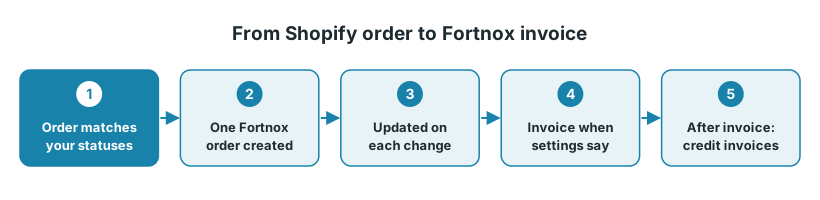
The settings below are under Configure → Settings, on Export Orders to Fortnox unless another flow is named.
1. What sends the order
The flow Export Orders to Fortnox runs on a schedule, for example every 5 or 15 minutes, by webhook when Shopify reports a new or updated order, or both. Each scheduled run picks up the orders created or changed since the last run.
An edit, a fulfilment or a cancellation in Shopify counts as a change. The order is then picked up again, and the Fortnox order is updated, as long as it hasn't been invoiced.
2. Which orders are sent
The setting Shopify Order Statuses (in Order Settings) decides which status an order needs before it is sent:
Nothing selected: every order is sent on the first run after it is created.
Fulfillment: Fulfilled: the order is sent when it has been shipped in full.
Fulfillment: Fulfilled and Fulfillment: Partially Fulfilled: the order is sent when the first part has been shipped.
Other settings, for example a country or an exclusion date, can also hold an order back. See Orders not showing up in Fortnox.
An order shipped in two parts is still one Fortnox order. Invoicing each delivery separately is done in Fortnox.
3. When the invoice is created
Your setup | When the invoice is created |
|---|---|
Transform new orders to Invoice in Fortnox is Yes (in Invoice Settings) | Straight after the order is created in Fortnox. With Transform Only Paid Orders, only orders that are already paid. |
The flow Transform Fortnox orders to Invoices is on | When that flow runs. With the filter Shipment Status = Fulfillment: Fulfilled on the flow, only when the order has been shipped in Shopify. |
Neither | You invoice in Fortnox yourself. |
Good to know:
Book keep converted invoices (default Yes) books the invoice when it is created. Send Invoice decides whether it is sent to the customer.
The invoice date is the date the payment was captured in Shopify. If you capture payment when you ship, that is the shipping date.
If both flows run on a schedule, choose Trigger after another job for the invoice flow on Configure > Scheduling, so it starts after the order flow.
4. Changes after the order was sent
After the invoice is created, changes are no longer applied: a booked invoice can't be edited (the log says "Fortnox invoice (…) is already booked"). Corrections are made with credit invoices, which Export Refunds to Fortnox creates from Shopify refunds.
Removing an item by editing the order is a refund in Shopify, and the line stays on the order. So the Fortnox order keeps the item, and the removal arrives only as a credit invoice. If you invoice by hand, correct it by hand too.
See Refunds and returns in Fortnox and Fortnox order row settings and post-purchase modifications.
5. Cancellations
Cancelled in Shopify: Canceled Order Status (in General Settings) sets which Shopify statuses cancel the Fortnox order, for example Order Cancelled. If it is empty, nothing is cancelled. An invoice already created is not touched; refund the order in Shopify to get a credit invoice.
Cancelled in Fortnox: the flow Update Order Statuses in Shopify can cancel the Shopify order. In its setting Map Order Statuses/Actions, map Cancelled to one of the Cancel Order actions. Leave Close Order out: it doesn't do anything yet.
6. Shipping from several stores (Fortnox warehouse module)
With the warehouse module, keep Mark order as Warehouse Ready / Delivered before creating invoice (in Invoice Settings) on: Fortnox won't invoice an order that isn't marked as delivered. The stock leaves the stock point at that step. If the invoice is created at checkout and another store takes over the order later, the stock has already left the first stock point.
To let the stock follow the order until it ships, set Set Delivery State when order is created (in General Settings) to reservation, and invoice only shipped orders with the Shipment Status filter above. The Fortnox order then only reserves the items.
7. When to contact support
Contact support@junipeer.io if orders or invoices reach Fortnox at the wrong moment. Include a Shopify order ID and a task ID from the Logs or Tasks page.